 |
Download the project (with Prof-UIS&ProfAuto MBCS Debug libs&dlls), 3003KB |
Contents
Introduction
Quite often nowadays, applications feature support for scripting. In other words such applications can be programmatically customized. This makes the application more valuable and appealing to the customers since they can add new functionality or customize existing features with script code.
Prof-UIS significantly eases implementing scripting facilities by providing the developer with a set of OLE Automation objects. This makes possible to easily customize Prof-UIS applications programmatically using one of the scripting languages available within the Active Scripting framework like VBScript or JScript. For example, you can use a script that adds some toolbars, named commands, buttons, and message handlers at runtime. Such a script may be loaded from a file, database or from whatever you want.
ProfAuto
Scripting facilities in Prof-UIS are provided by ProfAuto, a standalone COM library which should be registered with the RegSvr32 utility before it is used. ProfAuto implements a set of Automation classes for customizing graphical user interface elements at runtime programmatically:
| Automation class
COM interface |
Description |
| CExtAutoWindow
IExtAutoWindow |
Allows you to manage:
- command collection
- menu bar (a set of menu lines in case of MDI applications)
- toolbar collection
- command categories
- styles and settings
|
| CExtAutoCommandsCollection
IExtAutoCommandsCollection |
Allows you to add a new command or remove an existing one, to check whether the command exists, and to get the command object by its name or numeric identifier. |
| CExtAutoCommand
IExtAutoCommand |
Enables you to manage a particular command object, which may be assigned to one or more toolbar buttons and/or menu items. |
| CExtAutoToolbarsCollection
IExtAutoToolbarsCollection |
Allows you to access the menu bar and toolbars in the frame window as well as to add and remove user-defined toolbars. |
| CExtAutoToolbar
IExtAutoToolbar |
Gives access to the toolbar's/menu bar's properties. This interface also allows you to get the collection of original buttons and collection of active buttons associated with the toolbar/menu. |
| CExtAutoToolButtonsCollection
IExtAutoToolButtonsCollection |
Enables you to manage a button collection, which is associated with a toolbar, menu bar, command category, or popup menu. |
| CExtAutoToolButton
IExtAutoToolButton |
Allows you to get and set properties of a particular button object. The button itself may contain a child button collection. |
| CExtAutoCategories
IExtAutoCategories |
Enables you to manage command categories displayed on the Customize form. |
| CExtAutoStatusBar
IExtAutoStatusBar |
Provides you with access to the status bar properties and collection of its status pane objects. |
| CExtAutoStatusBarItemsCollection
IExtAutoStatusBarItemsCollection |
Allows you to add/remove panes to/from the status bar. |
| CExtAutoStatusBarItem
IExtAutoStatusBarItem |
Enables you to manage a particular status pane. |
The instance of CExtAutoWindow is a top-level object, which gives you access to all other objects in ProfAuto. In your MFC application, you can get a pointer to the IExtAutoWindow interface by calling the AutomateFrame global function, which takes a pointer to the CFrameWnd-based window as an input parameter.
Commands
The key object in ProfAuto is the CExtAutoCommand command wrapper. Each item in the menu or button in the toolbar is associated with a command. Besides commands are assigned to push buttons and buttons with submenus in toolbars, popup menu items, text/combo fields, color pickers, and scroll bar/slider items. Some particular command may be assigned to different objects, so, for example, by clicking a button in a toolbar or selecting a menu item in a menu, the very same command is executed. The command object has a set of properties and, changing these properties affects all toolbar and menu bar items corresponding to this command.
Before adding any custom button to a toolbar or popup menu, you need to assign an existing command to it. If you remove a command object, the corresponding toolbar/menu items are also removed automatically. Each command object is uniquely identified by the basic command identifier with a numeric value in the range of 1 to 65535. You may also identify the command by name. Such property is treated as an internal command name and may not be equal to the command text in the menu or toolbar.
Toolbars
You can manage toolbars with the CExtAutoToolbarsCollection object and a set of CExtAutoToolbars toolbars. There is one and only one menu bar, which is a special case of the toolbar. Each toolbar, except user-defined toolbars, has two sets of buttons. The first collection contains original or initial buttons, which used for restoring customized or active buttons to their initial state. Active buttons present the second collection. Please note that if a toolbar is user-defined (i.e., created in the Customize dialog), the Reset operation is not available and the ActiveButtons property should not be used because the user-defined toolbar does not keep the collection of initial buttons.
Scripting Events
At the moment ProfAuto supports handling of the following events:
| Event |
Description |
| OnCommand |
Fired when a toolbar button or menu item is clicked/selected. |
| OnColor |
Fired when the current color the in a color picker is changed. |
| OnScroll |
Fired when the thumb position in a scroll bar/slider is changed. |
To make life easier for those who want implement scripting events support in their applications, ProfAuto also allows the developer to handle these events within the CExtAutoWindow object. This requires much less code in C++ implementation of the active script host. In this case, your script handlers should look like: 'VBScript
Sub AutoWindow_OnAnyCommand( objCommand )
...
End Sub
Sub AutoWindow_OnAnyCommand( objCommand )
...
End Sub
Sub AutoWindow_OnAnyCommand( objCommand )
...
End Sub
Typical scripting scenario
How to implement the active scripting support in your C++ application is described in the next sections. Let us take a look at what you should pay attention to when you write a ProfAuto script:
- To access properties and methods of the
CExtAutoWindow object, use the name you have selected when implementing the active script host, e.g. AutoWindow.
- AutoWindow gives you access to the collections implemented in ProfAuto:
'VBScript
Set commands   = AutoWindow.Commands
Set toolbars   = AutoWindow.Commands
Set categories = AutoWindow.Categories
- When a script is executed for the first time (or when you deleted the corresponding registry key), new commands are added. So, every time the application starts, you need to check whether a particular command exists:
'VBScript
'Suppose you want to have a command with the "Extra Command" name
Dim command
If commands.IsCommandExist("Extra Command") Then
Set command = AutoWindow.Commands.Item("Extra Command")
Else
Set command = AutoWindow.Commands.Add (0)
   With command
      Name      = "Extra Command"
      TextInMenu   = strCommandName & " in Menu"
      TextInToolbar    = strCommandName & " in Toolbar"
      StatusTipText    = "Some text"
      TooltipText    = "Some text"
      LoadIconFromModule "%SystemRoot%\system32\SHELL32.dll", 3
   End With
End With
- The same logic described in paragraph 3 is applicable to toolbars.
- To check whether a toolbar is the menu bar, use the method
IsMenuBar: 'VBScript
Set toolbars = AutoWindow.Commands
For i = 0 To toolbars.Count - 1
If toolbars.Item(i).IsMenuBar Then
Set menubar = toolbars.Item(i)
Exit For
End If
Next
- To add buttons to a toolbar, get its
CExtAutoToolButtonsCollection first and then use the method Add of the latter: 'VBScript
'Do not forget to pass the command object as the second parameter
Set button = toolbar.ActiveButtons.Insert ( _
toolbar.ActiveButtons.Count, _
command
)
- To build hierarchical command trees, use the
Children property of the button object.
- Use
AutoWindow_OnAnyCommand, AutoWindow_OnAnyColor, and AutoWindow_OnAnyScroll handlers for handling events. The objCommand command object passed as a parameter should be analyzed and appropriate actions for a particular command made.
Please note that to have access to the objects that are specific for your application (not dealing with Prof-UIS), you additionally need to implement scripting support for such objects. You may take a look at how it is done for ProfAuto and follow a similar approach.
Active Script Host
This section very briefly outlines the steps on how to use the Windows Active Scripting technology. For detailed information on this topic, please refer to MSDN (e.g., Microsoft Windows Script Interfaces-Introduction or Scripting Events) and other sources (e.g., The article by George Shepherd in MSJ).
Windows Active Scripting implies two sides:
- Active Scripting Engine is a COM component that implements some standard interfaces. Its main function is to play scripts written in a certain language. There are script engines for VBScript, JScript, and other languages. You need to decide which script engine you will instantiate in your application.
- Active Script Host is a COM object that at least implements
IActiveScriptSite interface, instantiates the scripting engine, provides the scripting engine with the script text, and performs some other tasks. It is a kind of proxy to the scripting engine.
Let's take see how you may implement the Active Scripting support in your application:
- Create a script host class and implement the
IActiveScriptSite interface in it.
- Implement the
IActiveScriptSiteWindow interface in it if you want support for popup windows in the scripting code (i.e., to make MsgBox() work in VBScript).
- Add a method to your script host class in which:
- Create an instance of the scripting engine
- Pass the address of your script host to the engine via the
SetScriptSite method of the IActiveScript interface
- Get a pointer to the
IActiveScriptParse interface and parse the script text
- Add required named items to the engine via the
AddNamedItem method of the IActiveScript interface. In case of ProfAuto, select a name for the CExtAutoWindow object (e.g., AutoWindow) and pass it as a first parameter. Use the very same name when you implement the GetItemInfo method of the IActiveScriptSite interface. Do not forget to specify the SCRIPTITEM_ISSOURCE flag if you want to have scripting support.
- Call the
IActiveScript::SetScriptState(SCRIPTSTATE_CONNECTED) method to run the script.
Adding Scripting: Step-by-Step Tutorial
Here are suggested steps on making your application scriptable. We will take an SDI application generated by the Visual C++ 6 and turn it into the Prof-UIS application that will allow you to run scripts written in VBScript.
- Run Visual C++ 6, select File->New, select MFC AppWizard (exe), type ProfUISTestScripting and click OK.
- Select Single document and unselect Document/View architecture support in Step 1.
- Leave all other settings intact and click Finish.
Adding Prof-UIS
Paths
- Add paths to Prof-UIS files. Select Tools->Options..., open the Options dialog and select the Directories tab. Add
- ...\FOSS Software\Prof-UIS\Include and ...\FOSS Software\Prof-UIS\PROFAUTO paths for include files
- ...\FOSS Software\Prof-UIS\Bin_600 for library files
- Open the Settings dialog (Project->Settings) and select Debug. Type the path to the Prof-UIS dll file in the Working directory: field.
- Include the Prof-UIS-AutomationPack.h in StdAfx.h (the headers for Prof-UIS and ProfAuto will be included automatically):
#include <Prof-UIS-AutomationPack.h>
Basic functionality
- In the MainFrame.h file replace
CStatusBar with CExtStatusControlBar and CToolBar with CExtToolControlBar. Add the definition for the menu bar: protected:
CExtMenuControlBar m_wndMenuBar;
- In the
CMainFrame::OnCreate method replace: if (!m_wndToolBar.CreateEx(this, TBSTYLE_FLAT, WS_CHILD
| WS_VISIBLE | CBRS_TOP | CBRS_GRIPPER | CBRS_TOOLTIPS
| CBRS_FLYBY | CBRS_SIZE_DYNAMIC) |
|!m_wndToolBar.LoadToolBar(IDR_MAINFRAME))
{
TRACE0("Failed to create toolbar\n");
return -1; // fail to create
}
if (!m_wndToolBar.CreateEx(this, TBSTYLE_FLAT, WS_CHILD | WS_VISIBLE | CBRS_TOP
      | CBRS_GRIPPER | CBRS_TOOLTIPS | CBRS_FLYBY | CBRS_SIZE_DYNAMIC)
      ||   !m_wndToolBar.LoadToolBar(IDR_MAINFRAME))
{
   TRACE0("Failed to create toolbar\n");
   return -1;      // fail to create
}
- Open String Table in the resources and add a string with
ID equal to ID_VIEW_MENUBAR. Set the following caption for it: Show or hide the menu bar\nToggle Menu Bar.
- Just before the code for creating and loading the toolbar, add the code for creating the menu bar:
if (!m_wndMenuBar.Create( NULL, this, ID_VIEW_MENUBAR  ))
{
   TRACE0("Failed to create menubar\n");
   return -1;      // fail to create
}
- Replace the MFC's function
EnableDocking: if( ! CExtControlBar::FrameEnableDocking( this ) )
{
ASSERT( FALSE );
return -1;
}
m_wndMenuBar.EnableDocking(CBRS_ALIGN_ANY);
DockControlBar(&m_wndMenuBar);
- Insert
m_wndMenuBar.EnableDocking(CBRS_ALIGN_ANY);
m_wndToolBar.EnableDocking(CBRS_ALIGN_ANY);
- Insert
DockControlBar(&m_wndMenuBar);
DockControlBar(&m_wndToolBar);
- Add this line before the method before return 0:
RecalcLayout();
- Override the
CMainFrame::PreTranslateMessage virtual function so that it will look like : BOOL CMainFrame::PreTranslateMessage(MSG* pMsg)
{
if( m_wndMenuBar.TranslateMainFrameMessage(pMsg) ) return TRUE;
return CFrameWnd::PreTranslateMessage(pMsg);
}
- To make the menus open immediately from the menu bar and disable the "rarely-used items" feature, add these two lines to the constructor of
CMainFrame: CExtPopupMenuWnd::g_bMenuExpanding = false;
CExtPopupMenuWnd::g_bMenuHighlightRarely = false;
- To show/hide the menu bar with a command, open the
IDR_MAINFRAME menu resource and add the ID_VIEW_MENUBAR item to the View menu (type &Menu Bar for the caption and Show or hide the menu bar\nToggle Menu Bar for the prompt). To enable this command, add the corresponding handlers to the CMainFrame message map (just before END_MESSAGE_MAP()): ON_COMMAND_EX( ID_VIEW_MENUBAR, OnBarCheck )
ON_UPDATE_COMMAND_UI( ID_VIEW_MENUBAR, OnUpdateControlBarMenu )
- The command manager is a key global object in Prof-UIS. You need to register the commands in it. Insert this code snippet at the beginning of the
CMainFrame::OnCreate method: CWinApp * pApp = ::AfxGetApp();
ASSERT( pApp != NULL );
ASSERT( pApp->m_pszRegistryKey != NULL );
ASSERT( pApp->m_pszRegistryKey[0] != _T('\0') );
ASSERT( pApp->m_pszProfileName != NULL );
ASSERT( pApp->m_pszProfileName[0] != _T('\0') );
ASSERT( pApp->m_pszProfileName != NULL );
HICON hIcon = pApp->LoadIcon( IDR_MAINFRAME );
ASSERT( hIcon != NULL );
SetIcon( hIcon, TRUE );
SetIcon( hIcon, FALSE );
CAutoCmdProfile *pProfile = new CAutoCmdProfile;
pProfile->m_sName = pApp->m_pszProfileName;
VERIFY(g_CmdManager->ProfileSetup(pApp->m_pszProfileName,
GetSafeHwnd(), pProfile));
VERIFY(g_CmdManager->UpdateFromMenu(pApp->m_pszProfileName,
IDR_MAINFRAME));
VERIFY(g_CmdManager->UpdateFromToolBar(pApp->m_pszProfileName,
IDR_MAINFRAME));
- Run the application. Now we will add support for GUI persistence and replace the base class of
CChildView so that we can edit scripts. We will also make the ProfUISTestScripting application customizable since otherwise ProfAuto cannot be used.
Serialization
- Pass Foss instead of Local AppWizard-Generated Applications in the
SetRegistryKey function called in the InitInstance method of the CProfUISTestScriptingApp class and call the function LoadStdProfileSettings then: SetRegistryKey(_T("Foss"));
LoadStdProfileSettings();
- Declare a variable of the
WINDOWPLACEMENT type in the public section of CMainFrame: WINDOWPLACEMENT m_dataFrameWP;
- Add these lines to the constructor of
CMainFrame: ::memset( &m_dataFrameWP, 0, sizeof(WINDOWPLACEMENT) );
m_dataFrameWP.showCmd = SW_HIDE;
- Load the GUI state in
CMainFrame::OnCreate just before you call the function DockControlBar: g_CmdManager->SerializeState(
pApp->m_pszProfileName,
pApp->m_pszRegistryKey,
pApp->m_pszProfileName,
false
);
CExtControlBar::ProfileBarStateLoad(
this,
pApp->m_pszRegistryKey,
pApp->m_pszProfileName,
pApp->m_pszProfileName,
&m_dataFrameWP
);
- Override the
DestroyWindow method in CMainFrame: BOOL CMainFrame::DestroyWindow()
{
CWinApp * pApp = ::AfxGetApp();
ASSERT( pApp != NULL );
ASSERT( pApp->m_pszRegistryKey != NULL );
ASSERT( pApp->m_pszRegistryKey[0] != _T('\0') );
ASSERT( pApp->m_pszProfileName != NULL );
ASSERT( pApp->m_pszProfileName[0] != _T('\0') );
VERIFY(
CExtControlBar::ProfileBarStateSave(
this,
pApp->m_pszRegistryKey,
pApp->m_pszProfileName,
pApp->m_pszProfileName,
&m_dataFrameWP
)
);
VERIFY(
g_CmdManager->SerializeState(
pApp->m_pszProfileName,
pApp->m_pszRegistryKey,
pApp->m_pszProfileName,
true)
);
return CFrameWnd::DestroyWindow();
}
Customization
- Inherit
CMainFrame from CAutoCustomizeSite, an extended version if CExtCustomizeSite: class CMainFrame : public CFrameWnd,
public CAutoCustomizeSite
- Prof-UIS implementation of the customize features requires OLE to be initialize. Because of this, call the
AfxOleInit in the CProfUISTestScriptingApp::InitInstance method just after AfxEnableControlContainer(): if( ! AfxOleInit() )
{
AfxMessageBox("OLE initialization failed.");
ASSERT( FALSE );
return FALSE;
}
- Before the call of
g_CmdManager->SerializeState() in CMainFrame::OnCreate(), add the following code: VERIFY(MenuInfoAdd(
this,
_T("Default"),
IDR_MAINFRAME,
true,
false)
);
VERIFY(MenuInfoLoadAccelTable(_T("Default"),IDR_MAINFRAME));
if(!EnableCustomization(this, __ECSF_DEFAULT))
{
ASSERT( FALSE );
return -1;
}
- After the call of
g_CmdManager->SerializeState() in CMainFrame::OnCreate(), add: CategoryUpdate( IDR_MAINFRAME );
CategoryMakeAllCmdsUnique();
CategoryAppendAllCommands();
CategoryAppendNewMenu();
CustomizeStateLoad(
pApp->m_pszRegistryKey,
pApp->m_pszProfileName,
pApp->m_pszProfileName
);
- Add the call of
CustomizeStateSave in CMainFrame::DestroyWindow() (after you got a pointer to CWinApp): CustomizeStateSave(
pApp->m_pszRegistryKey,
pApp->m_pszProfileName,
pApp->m_pszProfileName
);
Making CChildView CEdit-based
- In ChildView.h declare
CChildWnd as follows: class CChildView : public CEdit
- Remove the declaration of
OnPaint() from ChildView.h and its implementation from ChildView.cpp.
- Modify creation of the CChildView object in
CMainFrame::OnCreate() as follows: if (!m_wndView.Create(
AFX_WS_DEFAULT_VIEW
|WS_HSCROLL|WS_VSCROLL
|ES_LEFT|ES_MULTILINE
|ES_AUTOHSCROLL|ES_AUTOVSCROLL,
CRect(0, 0, 0, 0),
this,
AFX_IDW_PANE_FIRST
)
)
{
TRACE0("Failed to create view window\n");
return -1;
}
CEdit-based window.
Adding scripting support
ProfAutoAs it was mentioned above, first of all, in addition to Prof-UIS, you should use the ProfAuto library. Since it is a COM library, you need to register it with the RegSvr32 utility. You should also use the CAutoCustomizeSite class instead of CExtCustomizeSite (see Customization).
- The
CComPtr wrapper is handy for managing interface pointers, so include the corresponding header file to StdAfx.h: #include <atlbase.h>
- Declare a pointer to the
IExtAutoWindow interface in the protected section of the CMainFrame class: CComPtr < IExtAutoWindow > m_pAutoWindow;
- To initialize the pointer to
IExtAutoWindow, call the AutomateFrame global function of ProfAuto in CMainFrame:OnCreate() (just after the call of RecalculateLayout()): if ( FAILED ( ::AutomateFrame(
STATIC_DOWNCAST( CFrameWnd, this),
&m_pAutoWindow )))
{
TRACE0("Failed to create AutoWindow\n");
return -1; // fail to create
}
- Add a
WM_CLOSE message handler and release a pointer to IExtAutoWindow in it (Leave CFrameWnd::OnClose() intact): m_pAutoWindow.Release();
CFrameWnd::OnClose();
Script Host
- Add a new class derived from the
IActiveScriptSite and IActiveScriptSiteWindow public interfaces. Call it CActiveScriptHost.
- Include the header file for Active Scripting interfaces in StdAfx.h:
#include <activscp.h> // Active Scripting headers
- Include the header file for interface constants (like
CLSID_ExtAutoWindow) to StdAfx.cpp: #include <../ProfAuto/ProfAuto_i.c> //to StdAfx.cpp
- Somewhere at the beginning of ActiveScriptHost.cpp, add a macro definition to assert code conditions:
#define ASRT(X); if (FAILED(X)) { ASSERT ( FALSE ); return FALSE; }
- Add a public method for initializing the script host. The method may take in a script text and return a value that specifies whether initialization is successful:
bool Initialize(IExtAutoWindow* pAutoWindow,
      CString& strScriptBody );
- Declare
CLSID and HRESULT variables and get the class id for VBScript in CActiveScriptHost::Initialize(): CLSID clsid;
HRESULT hr;
ASRT( CLSIDFromProgID(OLESTR("VBScript"), &clsid) );
- Declare a pointer to
IExtAutoWindow in the private section of the script host class: CComPtr < IExtAutoWindow > m_pExtAutoWindow;
- In
CActiveScriptHost::Initialize(), initialize m_pExtAutoWindow, which will be used for querying interfaces of CExtAutoWindow: m_pExtAutoWindow = pAutoWindow;
- Declare pointers to the
IActiveScriptParse and IActiveScript interfaces in CActiveScriptHost: protected:
CComPtr m_pParser;
public:
CComPtr < IActiveScript > m_pEngine;
- Create the active script engine -- you get a pointer to
IActiveScript -- and, with SetScriptSite(), tell the scripting engine that this CActiveScriptHost object is a scripting host that it will interact with: ASRT ( m_pEngine.CoCreateInstance (clsid, NULL, CLSCTX_INPROC_SERVER ) );
ASRT( m_pEngine->SetScriptSite(this) );
- Query a pointer to
IActiveScriptParse, initialize the engine's parser, parse the script, and release the pointer to IActiveScriptParse: ASRT( m_pEngine->QueryInterface(IID_IActiveScriptParse,
(void**)&m_pParser) );
ASRT( m_pParser->InitNew() );
CComBSTR bstrScript ( strScriptBody );
hr = m_pParser->ParseScriptText( bstrScript, NULL,
NULL, NULL, 0, 0, 0L, NULL, NULL);
m_pParser.Release();
if ( FAILED (hr) ) return false;
- Declare a member variable of the
CString type to the script host class. It will specify the name of the CExtAutoWindow object. Initialize it in the constructor: CString m_strAutoWindow;
...
//In constructor CActiveScriptHost::CActiveScriptHost:
m_strAutoWindow = "AutoWindow";
- Let the scripting engine know, that the name AutoWindow is associated with an object. The information about this object can be requested via
IActiveScriptSite interface. The SCRIPTITEM_ISSOURCE flag tells the engine that AutoWindow sources events that the script can sink. The SCRIPTITEM_ISVISIBLE flag indicates that the name AutoWindow is available in the name space of the script: USES_CONVERSION;
ASRT( m_pEngine->AddNamedItem(
T2COLE(LPCTSTR(m_strAutoWindow)),
SCRIPTITEM_ISSOURCE | SCRIPTITEM_ISVISIBLE)
);
- The initialization of the script host is over, so add
return true; at the end of CActiveScriptHost::Initialize().
- Add a public method named RunScript, which returns a boolean value, to the script host class. Add the following code to the method:
HRESULT hr;
m_pEngine->SetScriptState(SCRIPTSTATE_CONNECTED);
if ( FAILED(hr) )
{
   AfxMessageBox("Error when invoking script");
   return false;
}
return true;
- Since
CActiveScriptHost is inherited from IActiveScriptSite and IActiveScriptSiteWindow, then we need to declare and implement their virtual methods. First declare them in the public section of the script host class: // IUnknown
STDMETHODIMP QueryInterface(REFIID riid, void** ppvObj);
STDMETHODIMP_(ULONG) AddRef();
STDMETHODIMP_(ULONG) Release();
// IActiveScriptSite
STDMETHODIMP GetLCID( LCID *plcid );
STDMETHODIMP GetItemInfo(
LPCOLESTR pstrName,
DWORD dwReturnMask,
IUnknown **ppunkItem,
ITypeInfo **ppTypeInfo
);
STDMETHODIMP GetDocVersionString( BSTR *pbstrVersionString );
STDMETHODIMP OnScriptTerminate(
const VARIANT *pvarResult,
const EXCEPINFO *pexcepinfo
);
STDMETHODIMP OnStateChange( SCRIPTSTATE ssScriptState );
STDMETHODIMP OnScriptError( IActiveScriptError *pase );
STDMETHODIMP OnEnterScript( void );
STDMETHODIMP OnLeaveScript( void );
// IActiveScriptSiteWindow
STDMETHODIMP GetWindow( HWND *phwnd );
STDMETHODIMP EnableModeless( BOOL fEnable );
- Add a reference counter to the private section of the class and intitilize it in the constructor:
ULONG m_ulRefs;

//In constructor CActiveScriptHost::CActiveScriptHost:
m_ulRefs = 0;
- The methods of
IUnknown may be implemented like this: STDMETHODIMP CActiveScriptHost::QueryInterface(REFIID riid, void ** ppvObj)
if (riid == IID_IUnknown)
*ppvObj = static_cast(this);
else if (riid == IID_IActiveScriptSite)
*ppvObj = static_cast(this);
else if (riid == IID_IActiveScriptSiteWindow)
*ppvObj = static_cast(this);
else {
*ppvObj = NULL;
return E_NOINTERFACE;
}
static_cast(*ppvObj)->AddRef();
return S_OK;
}
STDMETHODIMP_(ULONG) CActiveScriptHost::AddRef()
{
return ++m_ulRefs;
}
STDMETHODIMP_(ULONG) CActiveScriptHost::Release()
{
ULONG ulRefs = --m_ulRefs;
if (ulRefs == 0)
delete this;
return ulRefs;
}
- Now let's get to
IActiveScriptSite. In the GetLCID method you may specify the language used in the popup messages generated from the scripting engine: STDMETHODIMP CActiveScriptHost::GetLCID( LCID *plcid )
{
*plcid = MAKELCID(MAKELANGID(LANG_ENGLISH,
SUBLANG_ENGLISH_US),SORT_DEFAULT);
//*plcid = GetSystemDefaultLCID(); //Or use this
return S_OK;
}
- The
GetItemInfo method may be implemented like this: STDMETHODIMP CActiveScriptHost::GetItemInfo(
LPCOLESTR pstrName, DWORD dwReturnMask,
IUnknown **ppunkItem,
ITypeInfo **ppTypeInfo
)
{
if (dwReturnMask & SCRIPTINFO_IUNKNOWN){
if (!ppunkItem) return E_INVALIDARG;
*ppunkItem = NULL;
}
if (dwReturnMask & SCRIPTINFO_ITYPEINFO){
if (!ppTypeInfo) return E_INVALIDARG;
*ppTypeInfo = NULL;
}
USES_CONVERSION;
if (!_wcsicmp(T2COLE(LPCTSTR(m_strAutoWindow)), pstrName)){
if (dwReturnMask & SCRIPTINFO_IUNKNOWN)
{
m_pExtAutoWindow->QueryInterface(
IID_IUnknown,
(void**)ppunkItem
);
return S_OK;
}
else if (dwReturnMask & SCRIPTINFO_ITYPEINFO)
{
LPTYPELIB ptlib = NULL;
LPTYPEINFO ptinfo = NULL;
HRESULT hr = LoadRegTypeLib(
LIBID_PROFAUTOLib,
1,
0,
0,
&ptlib
);
if (FAILED(hr)) return E_NOTIMPL;
hr = ptlib->GetTypeInfoOfGuid(CLSID_ExtAutoWindow, &ptinfo);
if (FAILED(hr))
{
ptlib->Release();
return E_NOTIMPL;
}
ptlib->Release();
*ppTypeInfo = ptinfo;
return S_OK;
}
}
return TYPE_E_ELEMENTNOTFOUND;
}
- If you want to catch and display script errors, implement
OnScriptError() like this: STDMETHODIMP CActiveScriptHost::OnScriptError(IActiveScriptError *pError)
{
//Display a message box with information about the error.
EXCEPINFO einfo;
HRESULT hr = pError->GetExceptionInfo(&einfo);
if (SUCCEEDED(hr))
{
CString str(einfo.bstrDescription);
CString strError("Script Error");
strError += str;
DWORD dwSourceContext;
ULONG ulLineNumber;
LONG uCharPosition;
hr = pError->GetSourcePosition( &dwSourceContext,
&ulLineNumber,
&uCharPosition
);
CString strPos;
if (SUCCEEDED(hr))
{
strPos.Format("\nLine: %d\nSymbol: %d",
ulLineNumber + 1, uCharPosition);
strError += strPos;
}
::MessageBox(
AfxGetMainWnd()->GetSafeHwnd(),
strError,
_T("ActiveScripts"),
MB_ICONEXCLAMATION
);
}
return S_OK;
}
- To simplify the tutorial, we will leave other methods of
IActiveScriptSite unimplemented: STDMETHODIMP CActiveScriptHost::GetDocVersionString(
BSTR *pbstrVersionString)
{
return E_NOTIMPL;
}
STDMETHODIMP CActiveScriptHost::OnScriptTerminate(
const VARIANT *pvarResult,
const EXCEPINFO *pexcepinfo
)
{
return S_OK;
}
STDMETHODIMP CActiveScriptHost::OnStateChange( SCRIPTSTATE ssScriptState)
{
return S_OK;
}
STDMETHODIMP CActiveScriptHost::OnEnterScript(void)
{
return S_OK;
}
STDMETHODIMP CActiveScriptHost::OnLeaveScript(void)
{
return S_OK;
}
- To tell the scripting engine what window will be used for outputting popup messages, implement the
IActiveScriptSiteWindow interface: STDMETHODIMP CActiveScriptHost::GetWindow(HWND *phwnd)
{
if(phwnd==NULL) return E_POINTER;
*phwnd = AfxGetMainWnd()->GetSafeHwnd();
return S_OK;
}
STDMETHODIMP CActiveScriptHost::EnableModeless(BOOL fEnable)
{
return S_OK;
}
Putting all together
- Add this line to MainFrame.cpp:
#include "ActiveScriptHost.h"
- In
CMainFrame, declare a pointer to IActiveScript and an inline function that will release this pointer: CComPtr < IActiveScript > m_pActiveScript;
void _CloseScript()
{
if (m_pActiveScript)
{
m_pActiveScript->Close();
m_pActiveScript.Release();
}
}
- Call the
_CloseScript function at the beginning of CMainFrame::OnClose() to release the scripting engine and delete the script host object: _CloseScript();
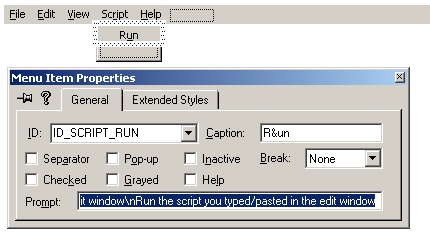
- Open the resource editor and create a menu item like on the figure below:
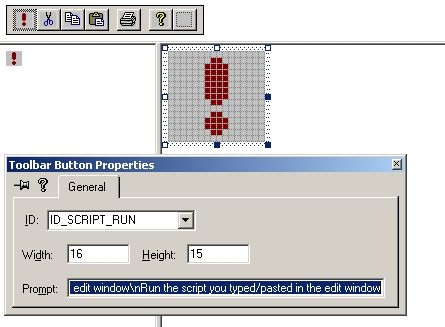
- In the resource editor, add a button to the
IDR_MAINFRAME toolbar and associate it with command ID_SCRIPT_RUN:
- Add a message handler for the command
ID_SCRIPT_RUN: void CMainFrame::OnScriptRun()
{
CString strScriptBody;
m_wndView.GetWindowText( strScriptBody );
if ( strScriptBody != "" ){
_CloseScript();
CActiveScriptHost* pHost = new CActiveScriptHost;
if ( pHost->Initialize( m_pAutoWindow, strScriptBody ) ) {
pHost->RunScript();
}
m_pActiveScript = pHost->m_pEngine;
};
}
- Allow ProfAuto to handle commands first at the beginning of
CMainFrame::OnCmdMsg(): if (CAutoCustomizeSite::OnCmdMsg(nID, nCode, pExtra, pHandlerInfo))
return TRUE;
- This step, which is optional, should allow you to use the "copy/paste" feature when you try the application. Add
COMMAND and UPDATE_COMMAND_UI handlers for ID_EDIT_COPY, ID_EDIT_CUT, and ID_EDIT_PASTE in the CChildView class: void CChildView::OnEditCopy()
{
Copy();
}
void CChildView::OnUpdateEditCopy(CCmdUI* pCmdUI)
{
int nStart, nEnd;
GetSel( nStart, nEnd );
BOOL bEnable = nStart != nEnd;
pCmdUI->Enable( bEnable );
}
void CChildView::OnEditCut()
{
Cut();
}
void CChildView::OnUpdateEditCut(CCmdUI* pCmdUI)
{
OnUpdateEditCopy( pCmdUI );
}
void CChildView::OnEditPaste()
{
Paste();
}
void CChildView::OnUpdateEditPaste(CCmdUI* pCmdUI)
{
pCmdUI->Enable( IsClipboardFormatAvailable( CF_TEXT ) );
}
Testing the application
- Make sure that
MsgBox "Some text"
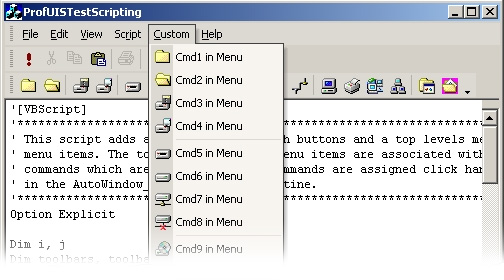
- Copy the following script and paste it in the edit window:
'[VBScript]
'***************************************************************************
' This script adds a custom toolbar with buttons and a top levels menu with
' menu items. The toolbar buttons and menu items are associated with
' commands which are also added. The commands are assigned click handlers
' in the AutoWindow_OnAnyClick() subroutine.
'***************************************************************************
Option Explicit

Dim i, j
Dim toolbars, toolbar
Dim strCustomToolbar
strCustomToolbar    = "Custom toolbar"


Dim commands 'the single collection of commands
Dim command(20), strCommand, strCommandName
strCommand = "Cmd"


Set commands = AutoWindow.Commands
'***************************************************************************
' IF CUSTOM COMMANDS DO NOT EXIST THEY SHOULD BE ADDED
'***************************************************************************
For i = 0 To UBound(command) - 1
   strCommandName = strCommand & CStr(i+1)
   If commands.IsCommandExist(strCommandName) Then
      Set command(i) = AutoWindow.Commands.Item(strCommandName)
   Else
      Set command(i) = AutoWindow.Commands.Add (0)
      With command(i)
         .Name          = strCommandName
         .TextInMenu    = strCommandName & " in Menu"
         .TextInToolbar = strCommandName & " in Toolbar"
         .StatusTipText = "Status tip for " & strCommandName
         .TooltipText    = "Tooltip for " & strCommandName
         .Enabled = True
         .LoadIconFromModule "%SystemRoot%\system32\SHELL32.dll", 1 + i
      End With
   End If
Next
'***************************************************************************
' CHECK WHETHER THE TOOLBAR FOR CUSTOM COMMANDS EXISTS
'***************************************************************************
toolbar = Null
Set toolbars = AutoWindow.Toolbars

For i = 0 To toolbars.Count - 1
   If toolbars.Item(i).Name = strCustomToolbar Then
      Set toolbar = toolbars.Item(i)
      Exit For
   End If
Next
'***************************************************************************
' IF THE TOOLBAR DOES NOT EXIST, IT IS ADDED.
' THE BUTTONS ASSOCIATED WITH CUSTOM COMMANDS SHOULD BE INSERTED TOO
'***************************************************************************
Dim button
If IsNull(toolbar) Then
   Set toolbar = toolbars.Add (strCustomToolbar)
   For i = 0 To UBound(command) - 1
      Set button = toolbar.ActiveButtons.Insert (i, command(i))
      If Round(i/4)*4 = i or i = 2 Then button.GroupStart = True
   Next
   toolbar.Reset
End If

'***************************************************************************
' MENU BAR
'***************************************************************************
Dim menubar
Dim topmenucmd, strCustomTopMenuCmd
Dim topmenubtn,  strTopMenuBtn
strCustomTopMenuCmd = "CustomTopMenuButton"

'***************************************************************************
' THE ITEM IN THE TOP MOST MENU (AND ITS COMMAND) SHOULD BE ADDED IF MISSED
'***************************************************************************
If Not commands.IsCommandExist(strCustomTopMenuCmd) Then
   Set topmenucmd = commands.Add(0)
   With topmenucmd
      .Name   = strCustomTopMenuCmd
      .TextInMenu = Chr(38) & "Custom"
      .CommandType = 1

   End With
Else
   Set topmenucmd = commands.Item(strCustomTopMenuCmd)
End If

For i = 0 To toolbars.Count - 1
   If toolbars.Item(i).IsMenuBar Then
      Set menubar = toolbars.Item(i)
      Exit For
   End If
Next

topmenubtn = Null

For i = 0 To menubar.ActiveButtons.Count - 1
   If (menubar.ActiveButtons.Item(i).ActiveCommand.Name _
      = strCustomTopMenuCmd) Then
      Set topmenubtn = menubar.ActiveButtons.Item(i)
      Exit For
   End If
Next

Dim child
Dim buttons
If IsNull(topmenubtn) Then
   Set topmenubtn = menubar.ActiveButtons.Insert (4, topmenucmd)
   Set buttons = topmenubtn.Children
   For i = 0 To UBound(command) - 1
      Set child = buttons.Insert (i, command(i))
      If Round(i/4)*4 = i Then child.GroupStart = True
   Next
End If
'***************************************************************************
' EVENT HANDLERS SECTION
'***************************************************************************
Sub AutoWindow_OnAnyCommand( objCommand )

   MsgBox "The command " & objCommand.Name & _
         " executed"
End Sub
- Run the script. Make sure that the script handles the click event.
NOTE: The application's GUI state is stored in the registry under the HKEY_CURRENT_USER/Software/Foss/ProfUISTestScripting. So, if you want to reset the application to its initial state, delete this key.
|